Detected results can be highlighted in a Crosstab report on any grid report that outputs a DETECT_FLAG column, similar to highlighting Action Level Exceedances in a crosstab report.
Note: A detected result is any result where the DETECT_FLAG value is "Y" or "TR". |
To do this, add the DETECTED column from the available columns to either the Column Header(s) or Row Header(s) panels in the Crosstab Configuration Form, then apply Exceedance formatting. Since the DETECTED column will be empty (no values are associated with it), users will likely want to hide this column.
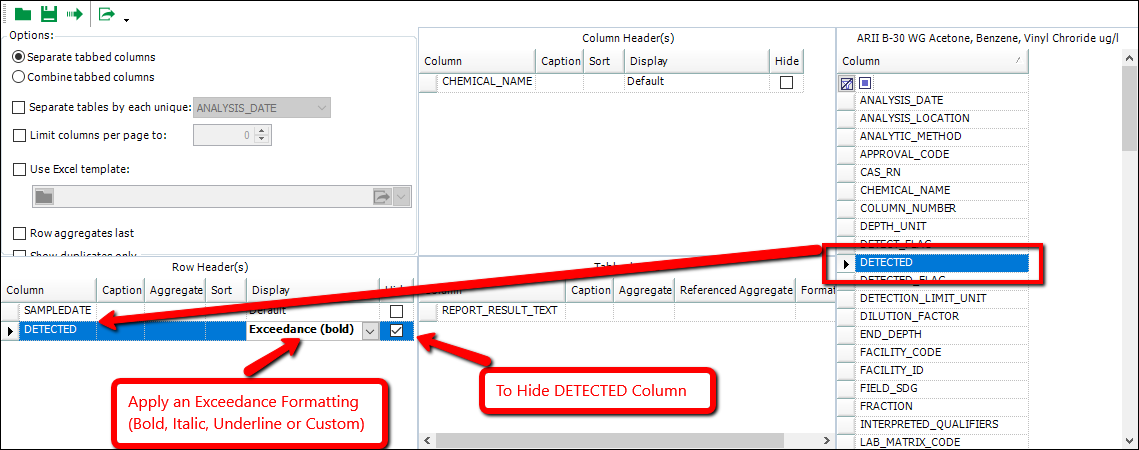
Notes: •Users can add the DETECTED column once to each of the Row Header(s) and Column Header(s) panes to combine Exceedance formatting. Do not add it more than once to either pane. •To utilize this feature, whenever the report contains the DETECT_FLAG column, the DETECTED and DETECTED_FLAG column are added to the list of columns in the Crosstab configuration. The DETECTED column is an empty column. The DETECTED_FLAG column has a flagged value for every DETECT_FLAG "Y" or "TR" value, similar to action level flags. With the DETECTED column in a header pane, the Crosstab will use the DETECTED_FLAG column to determine which report values are detections based on the flag. |