The Sample number (#) naming schema item allows a unique number to be assigned to each sample using one of the following options:
1.In one task only – Assigns a unique Sample # for all samples in the scheduled task.
2.For all recurring tasks – Assigns a unique Sample # for all scheduled samples within the same planned task.
3.For all tasks in plan – Assigns a unique Sample # for all scheduled samples across all planned tasks within the same plan.
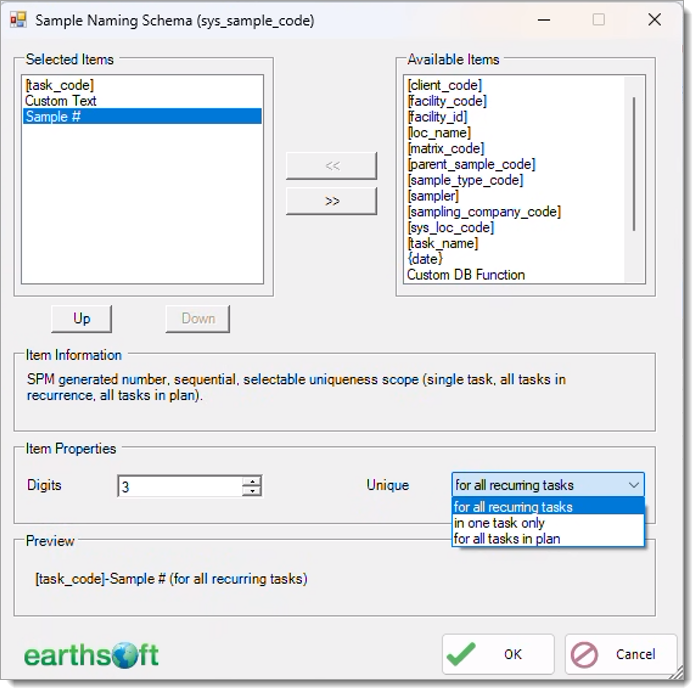
The following example shows the difference between the three options. For this example, assume that for one SPM plan there are:
•two planned tasks
•two scheduled tasks within each planned task
•three samples in each scheduled task
The table below shows the resulting sample numbers assigned for each of the Sample # options selected in SPM:
Planned Task Code |
Scheduled Task Code |
Defined Sample |
Resulting Sample Number |
||
|---|---|---|---|---|---|
In One Task Only |
For All Recurring Tasks |
For All Tasks in Plan |
|||
Planned Task A |
Task A1 |
Sample 1 Sample 2 Sample 3 |
1 2 3 |
1 2 3 |
1 2 3 |
Task A2 |
Sample 1 Sample 2 Sample 3 |
1 2 3 |
4 5 6 |
4 5 6 |
|
Planned Task B |
Task B1 |
Sample 1 Sample 2 Sample 3 |
1 2 3 |
1 2 3 |
7 8 9 |
Task B2 |
Sample 1 Sample 2 Sample 3 |
1 2 3 |
4 5 6 |
10 11 12 |
|